Cabinet Shop Software Between CAD and QuickBooks
By Cabinetshop Maestro • Updated 2026-05-18
Cabinet shop software that sits between CAD and QuickBooks is job management software, the layer that tracks a custom cabinet job from lead to install once drawings come out of CAD but before invoicing happens in accounting. Almost every cabinet shop already has a CAD tool (Cabinet Vision, Microvellum, SketchUp, KCD) and an accounting package (QuickBooks, Xero). What's missing is the system that handles everything in between: schedules, tasks, time tracking, client communication, and the running record of every decision on every job. That's the gap.
The two tools every cabinet shop already trusts
Walk into any custom cabinet shop and you'll find two pieces of software the owner won't give up:
- A CAD or drawing tool. Cabinet Vision, Microvellum, KCD, SketchUp, Mozaik. These produce the drawings, cutlists, and manufacturing data the shop builds from. They are essential, and they aren't going anywhere.
- An accounting package. QuickBooks, Xero, Wave, sometimes Sage. These handle invoicing, payments, payroll, and taxes. They are essential, and they aren't going anywhere either.
The problem isn't either of these tools. The problem is the months of work that happens between a drawing being approved and a final invoice being sent.

The gap nobody designed for
Once drawings are approved, the real job starts. A custom cabinet job moves through phases like:
- Lead intake and on-site measure
- Design and client revisions
- Approved drawings and signed contract
- Cutlist and material ordering
- Build (boxes, doors, drawer fronts, finishes)
- Finish and assembly
- Delivery and install
- Punchlist and final walkthrough
None of that lives in CAD. None of it lives in QuickBooks. It lives in a tangle of spreadsheets, email threads, sticky notes, text messages, whiteboards, paper folders, and the owner's memory. That tangle is where shops lose hours every week, miss client requests, mis-schedule install crews, and let small problems become callback-sized ones.
What "in-between" software needs to do
Software that fills the CAD-to-QuickBooks gap has to handle the actual day-to-day work of running cabinet jobs. At a minimum, it needs to do these things well:
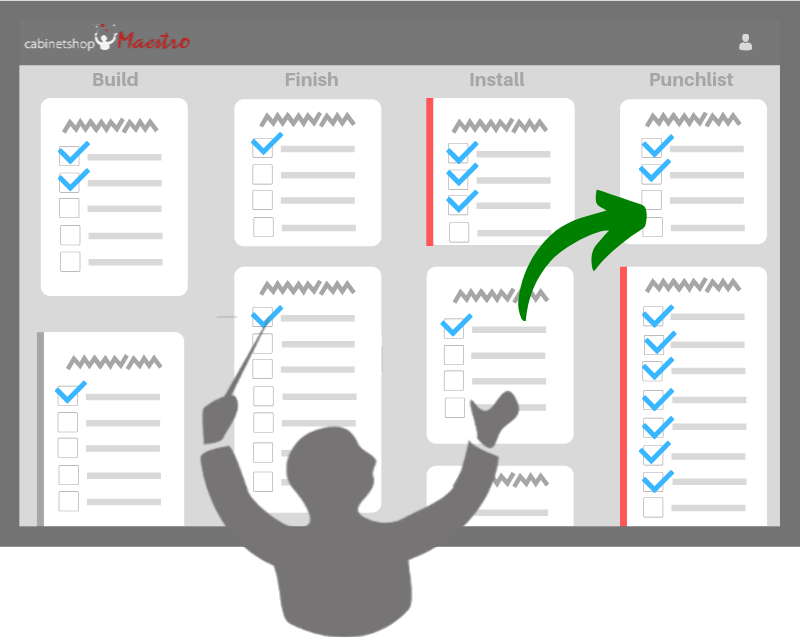
- Track every active job on one screen. A visual workflow board where every job's current phase is visible at a glance, so the whole team (shop floor, office, and field) knows what's where.
- Hold every detail tied to a job. A digital job folder for specs, drawings, finish selections, hardware, room layouts, client decisions, and the running thread of communication. One place, not eight.
- Schedule the shop, not just task lists. Calendar and timeline views of due dates, install windows, and milestones across all jobs.
- Assign tasks to people, not abstract roles. Foreman, finisher, installer, office manager: they all need to know what's on their plate today.
- Track time against jobs. So real hours per job become a number you can see, not a feeling.
- Communicate with clients without re-keying data. Progress updates, change orders, intake forms: all tied back to the job folder.
- Work on a tablet on the shop floor. Crew members shouldn't need to walk to the office to log time or check what's next.
That's the brief. Most shops don't have a single tool that does all of this. They have five or six tools that each do part of it, plus a lot of paper.
Why generic project management software fills this gap badly
The first thing most shops try is a generic project management app: Asana, Monday, ClickUp, Trello, Basecamp. These are real tools and they're not bad. They just weren't built for cabinet shops. A few specific reasons they tend to fall over:
- Their phases don't match a cabinet job. "To do / Doing / Done" doesn't capture lead → drawings → cutlist → build → finish → install. You end up bending the tool to fit, and it slowly stops being used.
- Their data fields are generic. A cabinet job has rooms, doors, drawer fronts, hardware, finishes, install dates, change orders. A generic PM tool has "task name" and "due date." You spend more time customizing than working.
- They have no concept of a job folder. Specs, drawings, client emails, and decision notes end up scattered across attachments, comments, and external storage.
- They don't talk to the shop floor. No kiosk mode, no time clock, no way for a finisher with sawdust on his hands to log a task without unlocking a phone.
- They charge per seat. A 10-person shop can pay more for Asana than for purpose-built cabinet shop software, and still be using 5% of the features.
How Cabinetshop Maestro fills the gap
Cabinetshop Maestro is built specifically for this in-between layer. The product is opinionated about how a cabinet job moves and what it needs:
- Workflow Board ships with phases custom shops actually use, not generic "to do / done" columns.
- Job Folder holds every drawing, spec, finish selection, hardware list, and client message tied to a job.
- Scheduling & Timelines show milestones and install windows across all jobs.
- Tasks get assigned to real people on the shop floor or in the field, with mobile access.
- Time tracking runs through a kiosk mode so the crew can punch in with a 4-digit PIN.
- Client communication is built in: draft a client update from live job data in a couple of clicks, and capture intake info by sending a prospect a link.
- Reports show actual time and cost by job so you know which jobs were profitable.
What it doesn't do: replace your CAD tool, replace your accounting software, or pretend to be a manufacturing ERP. Those are different jobs, done well by other tools. Maestro is the layer between them, built by a working cabinetmaker for the work that actually happens between drawings approved and final invoice sent.
Maestro vs. the usual alternatives
| Approach | What works | Where it breaks down |
|---|---|---|
| Spreadsheets + texts + whiteboards | Free, familiar, infinitely flexible. Works fine at 1-2 active jobs. | Falls apart fast as job count grows. Nothing is tied together. Whoever has the spreadsheet open last "wins." Client requests get lost in texts. |
| Generic PM (Asana, Monday, ClickUp, Trello) | Polished UI, lots of integrations, good for software teams. | Phases don't match cabinet work. No job folder concept. No shop-floor time tracking. Per-seat pricing punishes growing teams. |
| Manufacturing ERP | Powerful for high-volume manufacturers with repeat SKUs. | Wildly overkill for a custom cabinet shop. Expensive, slow to implement, designed for production lines that build the same thing twice. |
| Cabinetshop Maestro | Built for the CAD-to-QuickBooks gap. Pre-configured for custom cabinet workflows. Web-based with shop-floor kiosk. Flat monthly price. | Doesn't design cabinets (use your CAD tool). Doesn't handle accounting (use QuickBooks). Doesn't run a manufacturing line. |
FAQs: Cabinet shop software between CAD and QuickBooks
Why do cabinet shops need software between CAD and QuickBooks?
Because the months of work between an approved drawing and a final invoice (schedules, tasks, time tracking, client communication, decision notes) don't live in either tool. Without a system that fills that gap, shops manage it with spreadsheets, sticky notes, and group texts, which break down fast as job count grows.
Does Cabinetshop Maestro replace Cabinet Vision or Microvellum?
No. Cabinet Vision, Microvellum, KCD, SketchUp, and Mozaik are CAD and drawing tools. They design cabinets and generate cutlists. Maestro is job management. Most shops run a CAD tool and Maestro side by side: drawings come out of CAD, the rest of the job lives in Maestro.
Does Cabinetshop Maestro replace QuickBooks?
No. Maestro is not accounting software. Final invoicing, payments, payroll, and tax reporting stay in QuickBooks or whatever accounting tool you use. Maestro handles job management, the work between drawings approved and final invoice sent.
Why not just use a generic project management tool like Asana or Monday?
Generic PM tools are designed to fit any workflow, which means they don't fit a custom cabinet shop's workflow well. Their phases don't match cabinet work, their data fields are generic, they have no job folder concept, and they don't have shop-floor time tracking. They can be made to work, but most shops eventually stop using them.
Is a manufacturing ERP a better fit than Cabinetshop Maestro?
For most custom cabinet shops, no. Manufacturing ERPs are built for production lines that build the same thing repeatedly. Custom cabinet shops build one-off jobs to client specs. That's a different problem. ERPs are expensive, slow to implement, and overkill for the kind of work most custom shops actually do.
Can Cabinetshop Maestro integrate with my CAD tool or QuickBooks?
Maestro is browser-based and works alongside your existing CAD and accounting tools rather than tightly coupling to them. You can attach PDFs (drawings, cutlists, specs) to the relevant job folder. For accounting, the convention most shops use is to track jobs in Maestro and invoice from QuickBooks, keeping each tool focused on what it does best.
What does software in this gap typically cost?
Cabinetshop Maestro is a flat monthly subscription: $199/month Pro for up to 20 users, $399/month Enterprise above that. Within a tier it's a flat fee, not per seat, so adding a foreman, an office manager, or a couple of installers doesn't change the price. See the pricing page for what's included at each tier.
How long does it take to get a shop running on Maestro?
Most shops are up and running with their active jobs entered within a couple hours. The recommended approach is to start simple (workflow board plus a few jobs) and layer in tasks, time tracking, and client communication over the first month as the team gets comfortable.
The bottom line
Cabinet shops don't need to replace CAD or QuickBooks. They need a system for the months of work that happens between the two. Cabinetshop Maestro is that system, purpose-built for custom cabinet shops, opinionated about how a job moves from lead to install, and priced as a flat monthly subscription rather than per seat. If your shop has a CAD tool and an accounting package but everything else lives in spreadsheets, sticky notes, and group texts, the gap is what's costing you time. Maestro fills it.
Try Cabinetshop Maestro® Today!
Nothing to download, nothing to install, and no contracts.