What is Cabinetshop Maestro?
By Cabinetshop Maestro • Updated 2026-05-18
Cabinetshop Maestro is job management software for custom cabinet shops that tracks jobs from lead to install with workflow boards, scheduling, tasks, and client communication. Built by a 21-year custom cabinetmaker, Maestro sits between your design tools (CAD, SketchUp, Cabinet Vision, Microvellum) and your accounting software (QuickBooks, Xero), handling everything in between: drawings, cutlists, schedules, shop-floor tasks, time tracking, and client updates.
Who built it
Cabinetshop Maestro was built by Brian Haughey, a custom cabinetmaker with 21 years in the shop. After years of watching his own crew, and other shops he knew, fight with spreadsheets, sticky notes, and generic project management apps that didn't fit the work, he built Maestro to handle the actual workflow a custom cabinet job moves through.
That trade-first origin shapes the product: the phases, the data fields, the way information is organized, and the language on screen all match how cabinetmakers already think and talk about a job. See about the company for the full story.

What Maestro does
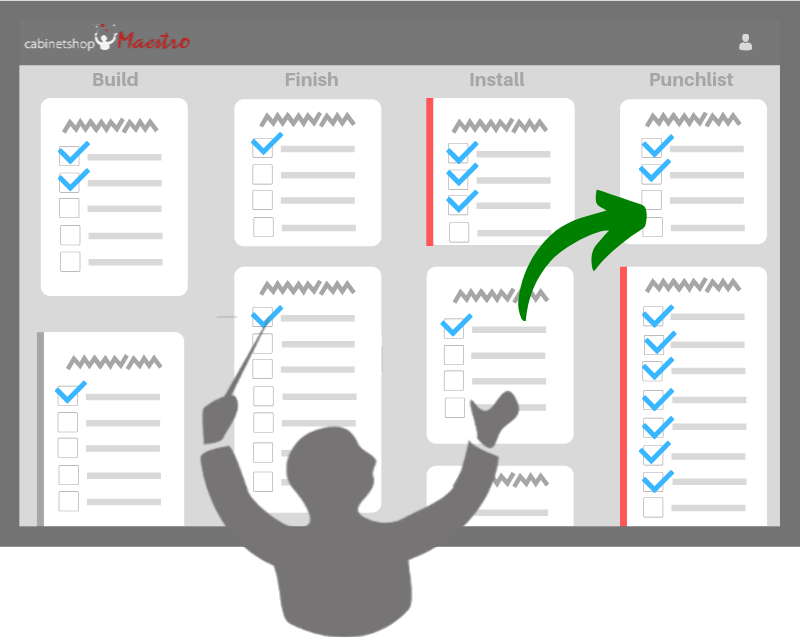
Maestro organizes a cabinet job around the way the work actually happens (Lead → Approved Drawings → Cutlist → Build → Finish → Install), with every active job visible on a workflow board and every detail living in a digital job folder. The core features:
- Workflow Board: drag-and-drop visual board of every active job and its current phase. The whole team sees what's where.
- Job Folder: one place for every spec, drawing, room layout, material list, decision note, and client message tied to a job. No more hunting through email threads or paper folders.
- Scheduling & Timelines: calendar view of due dates and milestones across all jobs, so the office knows what's coming up and the shop knows what's next.
- Tasks: assign work to people in the shop, on-site, or in the office. Track completion in real time.
- Client Communication: draft client update emails from live job data, capture intake info from a shared link, and keep every client conversation tied to the job folder.
- Time Tracking & Time Cards: log time against jobs and tasks. Kiosk mode turns any shared shop tablet into a 4-digit PIN time clock.
- Reports: actual time and cost by job and by phase, so you know which jobs were profitable and which ones taught you something.
Who it's for
Custom cabinet shops and woodworking businesses that build to order: kitchens, baths, built-ins, furniture, commercial millwork. Whether you're a one-person shop with a couple of part-time helpers or a 15-person shop with a foreman and an office manager, Maestro scales with your job count. The typical Maestro adopter is a shop that has outgrown spreadsheets, whiteboards, and group-text systems, but doesn't want to wrestle generic project management software into a shape it was never designed for.
Where it sits in your workflow: CAD → Maestro → QuickBooks
Most cabinet shops already use two tools they trust: a CAD or drawing tool (Cabinet Vision, Microvellum, SketchUp, KCD) on the design side, and an accounting package (QuickBooks, Xero) on the financial side. The gap between them (the actual job management work, where most of the shop's day lives) is where Maestro fits. Drawings come in from CAD; invoices and payments go out to QuickBooks. Everything in between (specs, schedules, tasks, client comms, time tracking, shop-floor handoffs) lives in Maestro.
| Tool | What it does | What it doesn't do |
|---|---|---|
| CAD / drawing software (Cabinet Vision, Microvellum, SketchUp) |
Design cabinets, generate cutlists, produce manufacturing data, render client previews | Track jobs through phases, schedule the shop, manage client communication, run time cards |
| Cabinetshop Maestro | Track jobs lead-to-install, organize every job detail, schedule the shop, manage tasks, communicate with clients, log time | Design cabinets, generate cutlists, file taxes, run payroll |
| QuickBooks / accounting | Invoicing, payments, payroll, taxes, financial reporting | Track a job through design, build, and install phases. Schedule shop work. Hold drawings, specs, and client conversations |
How Maestro differs from generic project management software
Generic tools like Asana, Monday, ClickUp, and Trello are designed to fit any workflow, which means they don't fit any trade-specific one well. A custom cabinet job has phases (lead, drawings, cutlist, build, finish, install) and data (rooms, doors, drawer fronts, finishes, hardware, install dates) that don't map cleanly to abstract "tasks" or "kanban cards."
Maestro is opinionated about how a cabinet job moves: it ships with the workflow phases custom shops actually use, the data fields cabinet jobs actually need, and the integrations cabinet shops actually want (digital job folder, shop-floor kiosk, intake form). You're not configuring a generic tool to act like a cabinet shop's. You're using a tool that already is one.
Pricing
Maestro is a monthly subscription. The pricing page has the full feature comparison, but the short version:
- Pro, $199/month. Full job management for a custom shop with up to 20 users: workflow board, job folders, scheduling, tasks, time tracking, client communication, reports.
- Enterprise, $399/month. For shops with more than 20 users; adds advanced reporting and additional integrations.
A free 14-day trial is available. A credit card is required to start the trial; you can cancel any time during the trial period.
How to try it
Two ways to get started:
- Start a free 14-day trial, full access, no feature restrictions.
- Watch a recorded demo first if you want to see the workflow board and job folder in action before signing up.
FAQs: Cabinetshop Maestro
Who is Cabinetshop Maestro for?
Custom cabinet shops, millwork shops, and custom woodworkers building to order: kitchens, baths, built-ins, furniture, and commercial millwork. Typical Maestro adopters are shops that have outgrown spreadsheets and whiteboards and need a single system that the whole team (shop floor, office, and field) can work from.
Is Cabinetshop Maestro the same as Cabinet Vision or Microvellum?
No. Cabinet Vision and Microvellum are CAD and drawing tools. They design cabinets, generate cutlists, and produce manufacturing data. Cabinetshop Maestro is job management. It tracks jobs from lead to install, including drawings, schedules, tasks, time, and client communication. Most shops run a CAD tool and Maestro side by side.
Does Maestro replace QuickBooks?
No. Maestro doesn't replace your accounting software. It sits between your design tools and your accounting package. Final invoicing, payments, payroll, and tax reporting stay in QuickBooks (or whatever accounting tool you use). Maestro handles the job management work in between.
Is it web-based or installed?
Web-based. Maestro runs in any modern browser (desktop, tablet, or phone). There's nothing to install, and your data syncs across devices instantly. There's also a kiosk mode for shared shop-floor tablets.
How long does setup take?
Most shops are up and running with their active jobs entered within a couple hours. You can start simple (workflow board plus a few jobs) and layer in tasks, time tracking, and client communication over the first month as the team gets comfortable.
Is there a free trial?
Yes, a 14-day free trial with full access to every feature. A credit card is required to start the trial. You can cancel any time during the trial period.
Who built Cabinetshop Maestro?
Cabinetshop Maestro was built by Brian Haughey, a custom cabinetmaker with 21 years in the shop. The product was originally built to solve problems in his own shop, and is shaped by working cabinetmakers, not by software people guessing at the workflow.
How is Maestro different from generic project management software?
Generic tools like Asana, Monday, ClickUp, and Trello are designed to fit any workflow, which means they don't fit a custom cabinet shop's workflow well. Maestro ships with the phases (lead → drawings → cutlist → build → finish → install), the data fields (rooms, doors, finishes, hardware), and the integrations (job folder, shop-floor kiosk, intake form) that custom cabinet jobs actually need.
The bottom line
Cabinetshop Maestro is the job management layer purpose-built for custom cabinet shops. It tracks jobs from lead to install, organizes every job detail in a digital job folder, gives the whole team a single workflow board, and handles client communication, scheduling, and time tracking, without forcing your trade-specific workflow into a tool that was designed for software teams or marketing agencies. If your shop has outgrown spreadsheets and you've never found a project management app that fits the way a custom cabinet job actually moves, Maestro is built for you.
Try Cabinetshop Maestro® Today!
Nothing to download, nothing to install, and no contracts.